 FoxxDen
What’s new
Every FoxxDen update, newest first. Updates are free. If yours hasn’t arrived yet, open the App Store, tap your picture at the top and pull down to refresh, then tap Update next to FoxxDen.
1.2.3 · November 2026
Better, more accurate and faster scanning.
- A PDF or CSV statement now replaces what FoxxDen had for its dates, balances included, so nothing is counted twice. Anything you added that isn’t on it is shown for you to keep or remove.
- Statements and screenshots are read more reliably, with fixes for dates, names and payment types
- Pending card payments wait until they’ve cleared, and round-ups to a savings Space are kept separate
- A screenshot that shows your balance is checked against FoxxDen after the scan
- Large statements open much faster, and the Delete button on a payment is always in reach
1.2.2 · November 2026
- FoxxDen now looks a full year ahead by default (it was six months), so Safe to save, your goals and “Spare in…” take next year’s bills into account. If you hadn’t picked your own setting, you’ll see a one-off note about the change. You can change it any time in More → Forecast settings.
- Scanning screenshots is more careful: an amount it can’t read is shown for you to check, a screenshot with its date cut off asks you to pick the day, and a day split over two screenshots keeps its date
- Mark money moved to your own account at another bank, so it isn’t counted as spending
- If a payment looks like one you already have under another name, FoxxDen asks whether it’s the same payment, so it’s neither counted twice nor lost
- Clearer wording around Safe to save and card payments
- A date typed into Ask FoxxDen now wins over a holiday word (“Christmas shopping on 19 December” uses the 19th)
1.2.1 · November 2026
A bug fix. Balance warnings now arrive once, when they’re due, instead of repeating each time you open the app. If you’ve been away for a while, you’ll get one summary rather than a pile of old alerts.
1.2 · November 2026
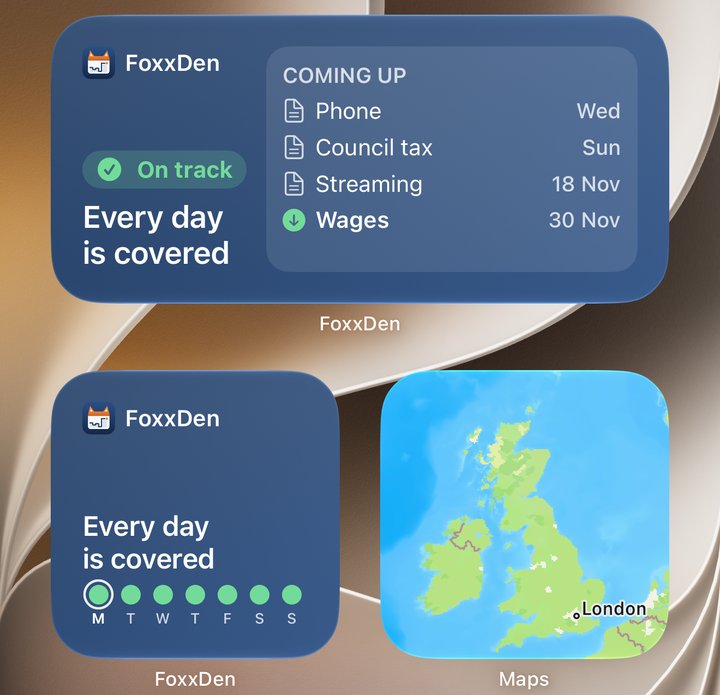
- Home Screen and Lock Screen widgets that say how things look in words, never your balances
- An optional Face ID lock (or Touch ID, or your passcode)
- Delete all your data in one go
- Spending accounts are checked against your real balance checks, with a suggestion to lower the top-up when money is building up there
- Occasional notifications when there’s money spare (you can turn these off)
- Ask FoxxDen knows your own account names, even with typos, and answers more: room to save each month, whether a new monthly payment fits, an all-in debt-free date, and what your savings, ISAs and crypto are worth
1.1 · October 2026
Scanning is much smarter
- Add CSV files from your bank or card app, as well as PDF statements and screenshots (up to 30 at a time)
- Overlapping screenshots, pending payments and payments your bank dates a day or two later are only counted once
- Every payment says whether it’s already in FoxxDen, one of your regulars, or new, and keeps the names you gave it
- If your bank’s balance is different, FoxxDen shows what explains it
- Scan statements from before you started to fill in earlier months you can look back on
Estimates that learn
- Spending estimates move towards what you really spend, and the rest of the week is kept when a scan ends part-way through
- Tap an estimate to see the payments behind it, keep your own amount, or make a payment a regular of its own
Also new
- A bills check and “Spare in…” for each account
- Card payments are checked every 3 months, and after a big pay-down
- Lots of smaller fixes
1.0 · October 2026
The first version of FoxxDen. See your balance for every day ahead, know what’s safe to save, and plan which card to pay off first.
Something not working, or an idea for the next update? Email support@foxxden.co.uk.
Foxx