 FoxxDen
How to save for Christmas, a little each month
Christmas is the one big cost we know the exact date of, years ahead. And yet for a lot of us it still ends up on a card, or in an overdraft that takes until spring to clear.
Work out yours: Saving for yearly bills calculator →
How much to put aside each month so Christmas is ready in time.
It isn’t because people are bad with money. It’s because Christmas is a yearly cost being paid for out of one month’s pay. The fix is the same as for any yearly bill: spread it out.
If Christmas is only weeks away
It’s too late to spread this one over a year, but not too late to plan it.
- Write down a number before you start buying. Presents, food, travel, and the bits that sneak up: wrapping, cards, drinks, the work do. One total, written down.
- Check it against what’s actually left. Take your balance, the bills still to go out before Christmas and your usual spending. What’s left over is your real Christmas budget. The will I make it to pay day calculator does the sums.
- Make the list fit the money, not the other way round. A Secret Santa, a spending limit agreed with family, or presents for the children only. Most people are relieved when someone suggests it.
- Plan January before you spend December’s pay. Many employers pay early in December. That’s nice at the time, but it can mean five weeks or more until the next pay day, with January’s bills in between. Work out what January needs and keep it aside first.
For next Christmas: start in January
This is the part that changes things. Take this year’s total, divide it by the months you have, and put that amount aside each month, the same way you pay any other bill. It fits neatly into a New Year money reset.
- Start early. From January there are eleven months to save before December. £550 for Christmas becomes £50 a month.
- Keep it separate. A savings pot or a second account, so it doesn’t look like spare money in October.
- Make it automatic. A standing order on pay day means you don’t have to remember, or decide again each month.
The yearly bill calculator works this out for you. Put Christmas in as a bill due in December, add anything you’ve already saved, and it shows the monthly amount.
It’s not just Christmas
The same thing works for every cost that comes once a year: car insurance, the MOT, the TV licence, birthdays, the summer holiday. Add them all to the calculator and you’ll see one monthly figure that covers the lot. I’ve written about giving that money a home in give every account a job.
How FoxxDen helps
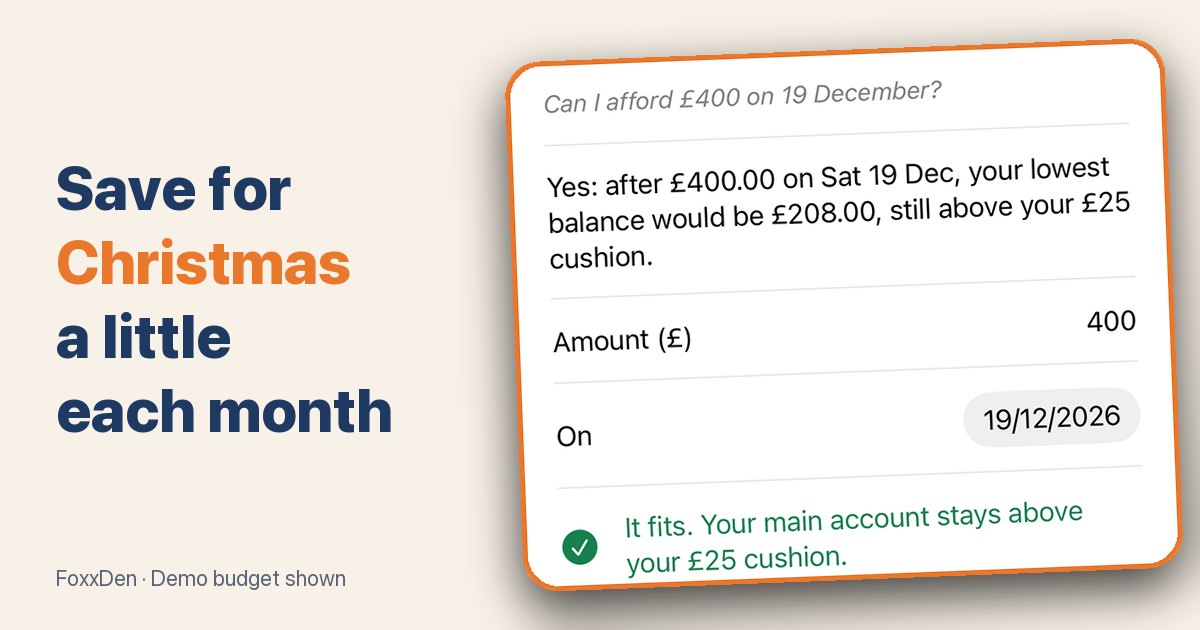
In FoxxDen you can ask “Can I afford £400 on 19 December?” and it checks every day after it, so you see your lowest balance with Christmas included, not just on the day. Yearly costs like Christmas sit in your plan on their real dates, so they show up months before they arrive, not on the morning they’re due.
However you do it, the aim is a Christmas that’s paid for by January, not one you’re still paying for in April.
— Foxx